

Is the HP OmniDesk RTX 5060 one of the best desktop computers for day trading? With a 20-core Intel Core Ultra 7 processor, 32GB of DDR5 RAM, a 2TB SSD, an NVIDIA RTX 5060 graphics card and support for up to four monitors, this high-performance workstation offers considerably more computing power than most traders need. In this article, we’ll explore its specifications, performance and multitasking capabilities, including how it handles multiple trading platforms, dozens of browser tabs, algorithmic trading, Python programming and AI trading applications. We’ll also examine its advantages, limitations and whether its premium hardware is worth the investment for your trading setup.

If you’re looking for one of the best desktop computers for day trading, but also want a machine powerful enough for algorithmic trading, Python programming and AI trading applications, the HP OmniDesk RTX 5060 is worth considering.
Equipped with a 20-core Intel Core Ultra 7 processor, 32GB of DDR5 RAM, a 2TB NVMe SSD and an NVIDIA RTX 5060 graphics card, this desktop has considerably more computing power than most traders need for everyday charting and order execution.
That additional performance gives you room to run multiple trading platforms, dozens of browser tabs, financial research tools and other applications simultaneously.
It also makes the HP OmniDesk an attractive option for traders interested in developing automated strategies, analyzing large datasets or experimenting with local AI trading models.
For traders who want a workstation that can handle much more than buying and selling stocks, this is where a high-performance desktop starts to make sense.
A powerful desktop for active trading, multiple monitors, algorithmic strategies, Python development and AI applications.
✓ 32GB DDR5 RAM
✓ NVIDIA RTX 5060, 8GB GDDR7
✓ 2TB PCIe Gen4 NVMe SSD
✓ Four native display outputs
HP OmniDesk RTX 5060: Key Specifications
The HP OmniDesk combines a powerful multicore processor with substantial memory, fast storage and dedicated graphics.
This configuration makes it suitable for demanding trading environments while leaving considerable processing capacity for other applications you might want to use while your online broker platform is running.

More Than Enough Computing Power for Day Trading
For most day traders, an expensive graphics card isn’t necessary.
Applications like TradingView, Interactive Brokers and other popular trading platforms generally depend more on CPU performance, available memory and a reliable internet connection than on dedicated graphics processing.
However, if you regularly run several applications simultaneously, a powerful desktop can make your entire workstation more responsive, especially during demanding periods of market activity.
The HP OmniDesk’s 20-core Intel Core Ultra 7-265F processor and 32GB of DDR5 RAM provide substantial computing resources for multitasking.
You can keep your broker open alongside multiple charting applications, financial news, spreadsheets, scanners and numerous browser tabs without immediately running into the limitations of a basic desktop computer.
For example, you could use one monitor for TradingView, another for your broker, a third for research and a fourth for Excel, Python or an AI coding assistant.
The real advantage of the HP OmniDesk RTX 5060 isn’t that this computer will make your trades execute faster. It’s that you have enough computing power to work with several demanding applications at the same time.

Run trading platforms, charts, financial research and multiple displays from one powerful desktop equipped with 32GB RAM and a 20-core processor.
Four Display Outputs for Multi-Monitor Trading
One of the more practical advantages of the HP OmniDesk is its dedicated NVIDIA RTX 5060 graphics card, which provides three DisplayPort 2.1b connections and one HDMI 2.1b connection.
That gives traders four native display outputs, making this configuration a natural choice for a three- or four-monitor trading workstation without requiring an additional graphics card or external USB display adapters.
You’ll still need compatible monitors and cables.
With four monitors, you could dedicate separate screens to market scanners, technical charts, order execution and financial news.
Alternatively, a trader who also develops automated strategies could reserve one display for Python, spreadsheets or other development tools.

An Excellent Desktop for Algorithmic Trading and Python
Where the HP OmniDesk becomes especially interesting is for traders who want to develop, test and eventually automate their own trading strategies.
Algorithmic trading can involve considerably more than running a broker platform.
Depending on your workflow, you may need to download years of historical market data, calculate technical indicators, backtest hundreds of trading ideas and analyze the results.
The OmniDesk’s 20-core CPU, 32GB of RAM and 2TB NVMe SSD provide a strong foundation for these tasks. Multiple CPU cores are particularly useful when your backtesting software supports parallel processing, allowing independent tests or parameter combinations to run simultaneously.
The 2TB SSD also provides substantial room for historical price data, Python environments, trading journals, strategy results and other research files.
Whether you’re working with Python libraries, building a custom market scanner or testing an automated earnings strategy, this desktop has considerable room for increasingly demanding projects.
That being said, your actual performance will depend on your software and the size of your datasets.
From developing Python trading algorithms to running historical backtests and experimenting with AI, the HP OmniDesk RTX 5060 provides substantial computing power for traders who want to do more than analyze charts.
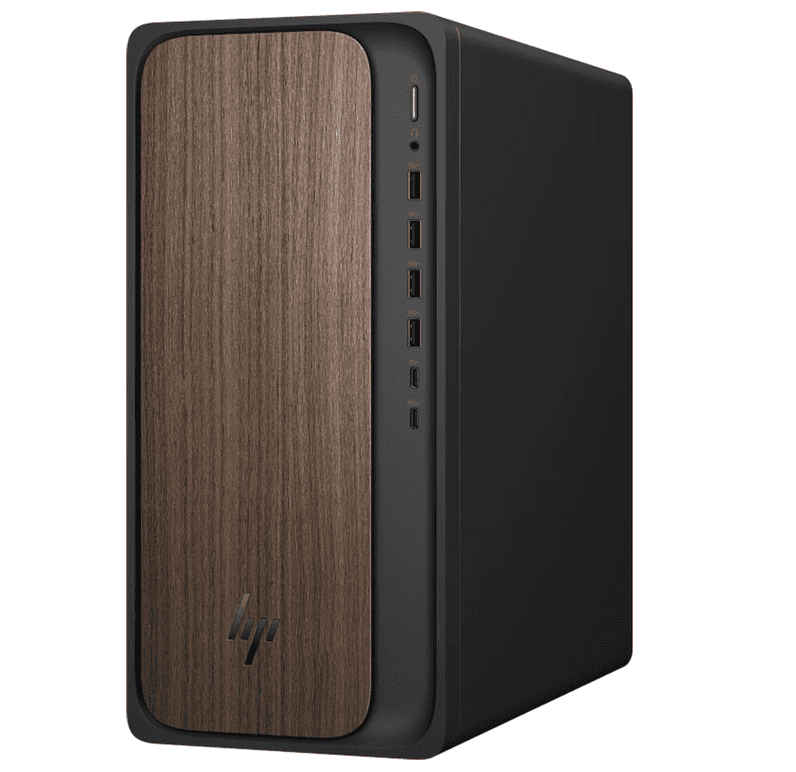
Explore the HP OmniDesk RTX 5060 for algorithmic trading, Python development and AI-assisted research.
Check the HP OmniDesk on Amazon →Dedicated RTX 5060 Graphics for AI and Machine Learning
Another major selling point is the NVIDIA RTX 5060 graphics card with 8GB of GDDR7 VRAM.
Although ordinary trading software doesn’t usually need this much graphics power, the GPU introduces additional possibilities for traders who want to work with AI.
NVIDIA graphics cards support GPU-accelerated computing frameworks used by many machine-learning applications. With compatible software, the RTX 5060 can accelerate certain model-training, inference and data-processing tasks that would otherwise run on your CPU.
You could experiment with smaller local AI models, develop AI-assisted trading research tools or explore machine-learning models for analyzing historical market data.
Python development environments and cloud-based AI coding assistants can also fit naturally into this workstation.
Keep in mind that 8GB of VRAM is a meaningful limitation for larger local AI models.
The RTX 5060 is useful for getting started with GPU-accelerated development, but it isn’t a replacement for professional AI hardware, and ordinary Python backtests won’t automatically benefit from GPU acceleration.
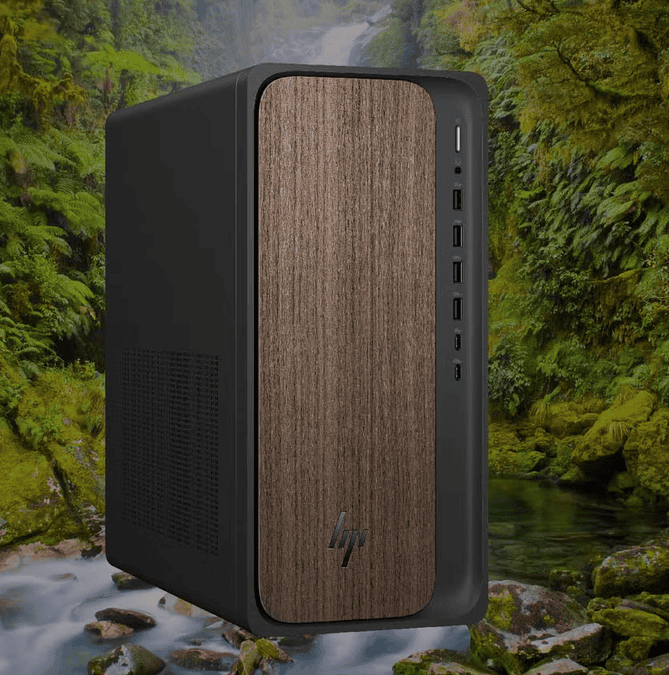
The HP OmniDesk brings together multicore CPU performance, fast SSD storage and dedicated NVIDIA graphics for traders who need more than a conventional office computer.
Fast Storage for Trading Data, Research and Content Creation
The HP OmniDesk’s 2TB PCIe Gen4 NVMe SSD is another advantage for traders who maintain large research libraries or work with substantial amounts of historical market data.
Beyond trading, the combination of fast storage, ample RAM and dedicated graphics makes this desktop suitable for video editing, financial content creation and other demanding applications.
For traders who also operate a financial website, produce educational videos or maintain custom trading tools, having one capable workstation for all these activities can be particularly convenient.
Where the HP OmniDesk Falls Short
Despite its powerful hardware, the HP OmniDesk isn’t necessarily the right choice for every day trader. In fact, it’s significantly more computer than most beginners or casual traders need.
If your entire workflow consists of one broker platform, a couple of charts and a few browser tabs, a less expensive desktop with a capable processor and sufficient RAM should serve you perfectly well.
The dedicated RTX 5060 also adds to the computer’s price and power consumption.
Unless you’re using GPU-accelerated applications, AI models, graphics-intensive software or a demanding multi-monitor setup, you may not take full advantage of the hardware.
In other words, especially for new day traders, the HP OmniDesk is probably MORE COMPUTER THAT YOU’LL ACTUALLY NEED.
For straightforward trading, a more affordable desktop such as the Dell Tower may be a more practical purchase.
Is the HP OmniDesk RTX 5060 Worth Buying for Day Trading?
The HP OmniDesk is a compelling option for active traders who want a powerful computer with enough processing capacity for both their current workflow and more advanced projects.
Its 20-core processor, 32GB of DDR5 RAM, 2TB SSD and four native display outputs make it well suited to multitasking across several monitors. Meanwhile, the dedicated RTX 5060 opens the door to machine learning, local AI experimentation and other GPU-accelerated applications.
If you simply need a desktop for checking charts and placing trades, much of that additional hardware will go unused.
But if your goals include algorithmic trading, Python development, large-scale backtesting, AI experimentation or content creation, the extra computing resources become much easier to justify.
For traders who want one workstation capable of handling trading, research, programming and more demanding creative or technical projects, the HP OmniDesk RTX 5060 deserves a place on your shortlist.
Trading, AI and Python Development
Advantages
✓ Powerful 20-core CPU
✓ 32GB DDR5 RAM
✓ RTX 5060 graphics
✓ 2TB fast SSD
✓ Four display outputs
✓ Strong multitasking
Considerations
✕ Premium price
✕ Overkill for basic trading
✕ Higher power consumption
✕ 8GB VRAM limits larger AI models
✕ GPU not needed for most brokers
Frequently Asked Questions About the HP OmniDesk RTX 5060
Is the HP OmniDesk RTX 5060 a good computer for day trading?
Yes. The HP OmniDesk RTX 5060 is a powerful desktop for day trading, particularly for active traders running multiple applications and monitors. Its 20-core Intel Core Ultra 7-265F processor, 32GB of DDR5 RAM and 2TB NVMe SSD provide substantial computing resources for trading platforms, financial research, technical charts and market scanners. It also offers additional performance for more demanding workloads, including programming, backtesting and AI applications.
How many monitors can the HP OmniDesk RTX 5060 support?
The HP OmniDesk configuration featured in this article has four native display outputs: three DisplayPort 2.1b connections and one HDMI 2.1b port. This allows traders to connect up to four compatible monitors without purchasing an additional graphics card. A four-monitor trading setup could accommodate separate screens for TradingView, a brokerage platform, financial news and market scanners. Supported resolutions and refresh rates depend on the monitors, cables and GPU configuration.
Is 32GB of RAM enough for professional day trading?
32GB of DDR5 RAM is more than sufficient for most day trading workflows. It provides considerable memory for running multiple brokerage platforms, technical analysis software, spreadsheets and numerous browser tabs simultaneously. Traders who also work with Python, historical market data or automated trading systems will appreciate the additional memory. However, exceptionally large datasets or demanding AI applications may benefit from 64GB or more.
Do you need an RTX 5060 graphics card for day trading?
No. Most day trading platforms do not require a powerful dedicated graphics card. An RTX 5060 is primarily beneficial for traders who want multiple native display connections or also use GPU-accelerated applications, machine-learning tools, video editing software or local AI models. For straightforward charting and order execution, a less expensive desktop with capable integrated graphics may provide everything you need.
Can the HP OmniDesk run TradingView and Interactive Brokers simultaneously?
Yes. With a 20-core processor and 32GB of RAM, the HP OmniDesk has ample hardware resources for running TradingView, Interactive Brokers Trader Workstation and other trading applications simultaneously. You can also keep financial news websites, spreadsheets, research tools and numerous browser tabs open. Actual performance will depend on your software configuration, internet connection and workload.
Is the HP OmniDesk RTX 5060 suitable for algorithmic trading?
Yes. The HP OmniDesk is well equipped for algorithmic trading, strategy development and historical backtesting. Its multicore processor can handle substantial calculations, particularly when backtesting software supports parallel processing. Meanwhile, the 32GB of RAM and 2TB SSD provide resources for working with historical market data, programming environments and trading research. The computer’s hardware does not guarantee faster backtests, however, as performance depends on how efficiently your software uses the available resources.
Can you run Python and AI trading tools on the HP OmniDesk?
Yes. The HP OmniDesk is suitable for Python programming, quantitative analysis, AI-assisted coding and machine-learning experiments. Its NVIDIA RTX 5060 graphics card supports compatible GPU-accelerated frameworks, while the CPU and RAM are well suited to conventional Python workflows. The GPU’s 8GB of VRAM can accommodate some smaller local AI models, although larger models and more demanding training workloads may require additional graphics memory or cloud computing resources.
Will a more powerful trading computer make my trades execute faster?
Not necessarily. A powerful computer can improve the responsiveness of demanding applications and reduce slowdowns caused by insufficient memory or processing power. However, trade execution speed also depends on your internet connection, brokerage infrastructure, market conditions and order routing. The HP OmniDesk’s greatest advantage is its ability to handle demanding multitasking and computational workloads rather than guaranteeing faster order execution.
Is a 2TB SSD necessary for day trading?
Most traders do not need 2TB of storage simply to run a brokerage platform and charting software. However, the HP OmniDesk’s 2TB PCIe Gen4 NVMe SSD provides considerable room for historical market data, strategy backtests, Python projects, screen recordings and research files. The additional capacity is particularly useful for algorithmic traders and financial content creators who maintain large local datasets.
Is the HP OmniDesk RTX 5060 worth the extra money for day trading?
That depends on your trading workflow. If you primarily use one brokerage platform and a handful of charts, a less expensive desktop will generally be sufficient. However, if you want to build a three- or four-monitor workstation, develop algorithmic trading strategies, run Python applications or experiment with AI, the HP OmniDesk offers considerably more computing resources. Its dedicated graphics card and multicore processor are especially relevant when your work extends beyond conventional day trading.
Can I add a GPU to HP OmniDesk?
Yes, you can add or upgrade a GPU in many HP OmniDesk desktops, provided the graphics card is compatible with the motherboard, power supply and available case space. The HP OmniDesk featured in this article already includes an NVIDIA RTX 5060 with 8GB of VRAM, so you wouldn’t need to add one for day trading or most AI applications. If you want to upgrade to a more powerful GPU later, check your exact model’s power supply wattage, PCIe power connectors and physical clearance before purchasing.


Leave a Reply