

In this guide, we break down what actually matters when choosing the best laptop for day trading, including how much RAM, storage, processing power, screen space and monitor support you really need. We’ll also look at why the Dell 16 Plus stands out as a strong all-around option, with 32GB of RAM, a 1TB SSD, an Intel Core Ultra 9 processor capable of reaching up to 5.1GHz, a 16-inch display and support for multiple external monitors through Thunderbolt 4, USB-C and HDMI.

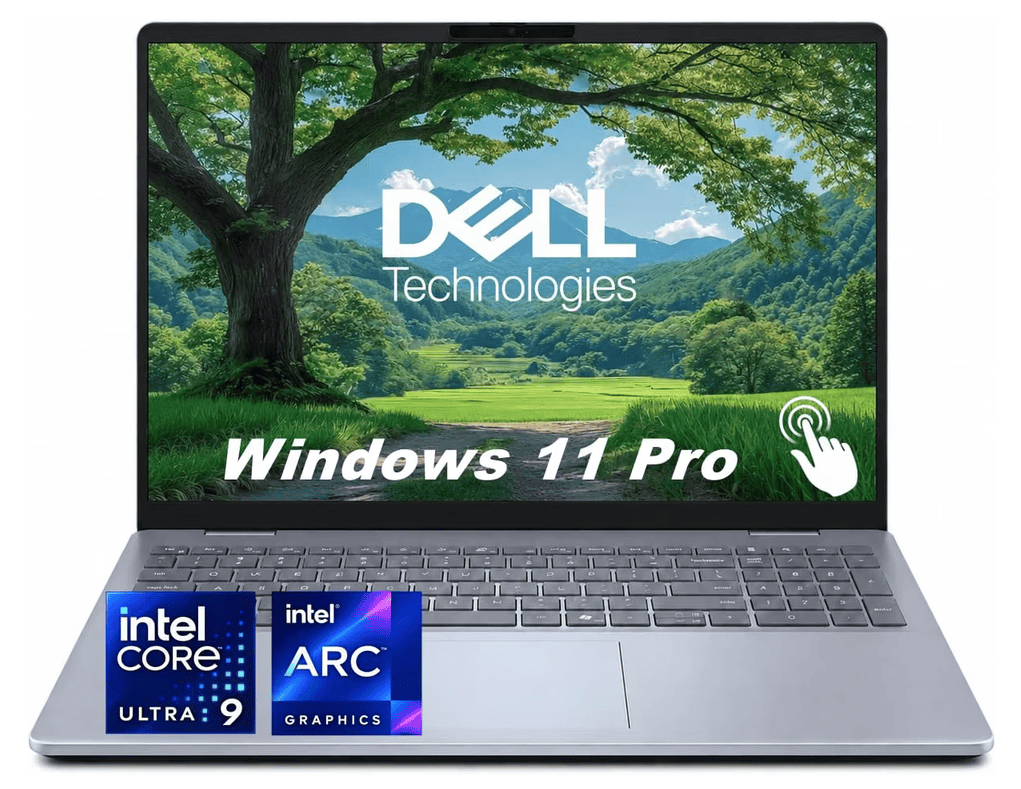
If I were trying to find the best all-around laptop for day trading, the Dell 16 Plus with the Intel Core Ultra 9 288V, 32GB of RAM and a 1TB SSD is about where I would stop shopping.
It isn’t a cheap entry-level laptop, but it also isn’t a $2,500 to $4,000 workstation loaded with an oversized dedicated graphics card that most traders will never actually use.
Starting at $1,469.00, this configuration lands in what I consider the sweet spot between price, performance and long-term versatility.
The configuration we’re looking in the following review is the one with an 8-core Intel Core Ultra 9 288V capable of boosting to 5.1 GHz, 32GB of LPDDR5X memory, a 1TB SSD, Intel Arc 140V graphics, Windows 11 Pro and a 16-inch 1920 × 1200 touchscreen.
32GB of RAM Is More Than Most Trading Platforms Require
Here’s where the numbers get interesting.
Interactive Brokers lists an Intel Core i5, 8GB of RAM and a 2K display as the minimum PC specification for Trader Workstation. Its recommended configuration moves up to an Intel Core i7+, 16GB of RAM and a 4K display. IBKR also specifies a broadband internet connection as the minimum for reliable connectivity.
That means this Dell’s 32GB of RAM provides 4X IBKR’s minimum requirement and 2X its recommended RAM requirement.
That’s the kind of overhead I like to see in a trading computer.
A trader rarely runs only a broker platform.
You might have TWS running alongside TradingView, a market scanner, Level 2 data, Excel, Discord, financial news, a dozen Chrome tabs and perhaps another analytics platform.
The Dell’s 32GB gives all of those applications room to coexist without turning RAM usage into a constant balancing act.
TradingView itself requires a modern 64-bit Intel or AMD processor and Windows 10 22H2 or Windows 11 22H2 or newer.
This Dell ships with Windows 11 Pro, putting it comfortably inside the modern trading-software ecosystem.

The Core Ultra 9 Is Serious Overhead for Trading
The Core Ultra 9 288V is an 8-core, 8-thread processor capable of reaching 5.1 GHz, paired with Intel Arc 140V integrated graphics.
You don’t need that much CPU performance simply to stream stock quotes.
But that’s exactly why I like it.
Your trading computer shouldn’t merely meet today’s minimum requirements.
Ideally, it should still feel fast several years from now while you’re running increasingly complicated chart layouts, scanning thousands of symbols, crunching spreadsheets and working across several applications simultaneously.
The 1TB SSD is another sensible middle ground.
Trading software itself doesn’t require anywhere near 1TB, but screenshots, exported market data, recorded trading sessions, spreadsheets and years of research can slowly consume storage.

This Is Where the Dell 16 Plus Really Wins: Multiple Monitors
The biggest reason I’d choose this laptop over a cheaper model is its ability to become the heart of a full trading workstation.
You get Thunderbolt 4 with DisplayPort 2.1 and Power Delivery, USB-C with DisplayPort 1.4, HDMI 2.1 and USB-A.
Dell explicitly supports docking through its USB-C/Thunderbolt connectivity.
More importantly, Dell lists the DB16250 as supporting two external displays while the laptop’s own display remains active, or three external displays with the internal screen disabled.
That makes this much more than a laptop.
Connect a Thunderbolt or USB-C docking station and you could build a desk with the Dell plus two external monitors, giving you three active screens.
At the desk, one monitor could hold charts, another could hold scanners/news/order entry, and the 16-inch laptop display could handle your broker, watchlist or secondary charts.
Then you unplug one cable and take essentially the same trading environment with you.
That’s versatility a desktop simply cannot match.
With 32GB of RAM, a 1TB SSD, Thunderbolt 4, DisplayPort over USB-C and HDMI 2.1, the Dell 16 Plus can work as both your portable trading computer and the centerpiece of a multi-monitor docking station.
Why I Think It’s the Best Middle Ground
Could you day trade on a $700 laptop? Absolutely.
Could you spend $3,000 on a high-end gaming machine with 64GB of RAM and an RTX graphics card? Absolutely.
I don’t think most traders need either extreme.
The Dell 16 Plus gives you 32GB RAM, 1TB of SSD storage, a 5.1 GHz Core Ultra 9 processor, modern Wi-Fi 7, a 16-inch screen and the connectivity required to build a legitimate multi-monitor workstation. The Amazon configuration also includes Bluetooth 5.3, a fingerprint reader, a backlit keyboard and Windows 11 Pro.

The FHD+ 1920 × 1200 display isn’t the highest-resolution laptop panel available, and traders wanting maximum chart density directly on the laptop may prefer a QHD+ configuration.
But once you factor in price, 32GB of RAM, processor performance and docking capability, I think this configuration hits an unusually good middle ground.
At $1,469.00 at the time of writing, you’re buying considerably more computing power than today’s major trading platforms require, without paying for workstation hardware that contributes very little to actual trading.
See the Dell 16 Plus on Amazon →For a trader who wants one computer that can function as a portable laptop today and the foundation of a two-, three- or multi-screen trading desk tomorrow, the Dell 16 Plus is one of the most balanced options I’ve found.
With 32GB of RAM, a 1TB SSD, Thunderbolt 4, DisplayPort over USB-C and HDMI 2.1, the Dell 16 Plus can work as both your portable trading computer and the centerpiece of a multi-monitor docking station.


Frequently Asked Questions About the Best Laptop for Day Trading
What is the best laptop for day trading?
The best laptop for day trading should combine a fast modern processor, at least 16GB of RAM, SSD storage, reliable Wi-Fi or Ethernet connectivity, and enough ports to support external monitors.
For most traders, we think the sweet spot is 32GB of RAM, a 512GB to 1TB SSD, and a modern Intel Core Ultra 7/9 or comparable AMD processor. You don’t necessarily need a high-end gaming laptop or dedicated graphics card.
The Dell 16 Plus configuration discussed above is a good example because its 32GB of RAM, 1TB SSD, Core Ultra 9 processor, 16-inch screen, Thunderbolt 4 and HDMI connectivity give traders plenty of performance without moving into ultra-expensive workstation territory.
How much RAM do I need for day trading?
We recommend:
- 8GB: Absolute minimum for basic trading
- 16GB: Recommended minimum for serious day trading
- 32GB: Ideal for most active traders
- 64GB+: Usually unnecessary unless you run unusually demanding applications
Trading software itself generally doesn’t consume enormous amounts of RAM. The problem is that traders rarely run one program.
You could have TradingView, your broker, Level 2 data, a scanner, Excel, Discord, financial news and 20 browser tabs open simultaneously. That’s where 32GB becomes particularly useful.
Is 16GB of RAM enough for day trading?
Yes. 16GB is enough for most day traders, especially if you aren’t running dozens of applications simultaneously.
However, if you’re buying a new trading laptop that you want to keep for several years, we’d lean toward 32GB. The additional memory provides considerably more multitasking headroom and makes it easier to expand your trading setup later.
Is 32GB of RAM overkill for trading?
Not really.
You probably won’t need all 32GB just to run your brokerage platform, but day trading is often a multitasking workload rather than a single-program workload.
A trader might simultaneously run:
TradingView + Interactive Brokers + scanners + spreadsheets + news + browser tabs + Discord + screen recording.
For that type of workstation, 32GB is a very reasonable target rather than excessive overkill.
What processor is best for a day trading laptop?
Look for a recent-generation processor such as an:
- Intel Core Ultra 5, 7 or 9
- Intel Core i5, i7 or i9
- AMD Ryzen 5, 7 or 9
For most traders, a modern Core Ultra 7/Core i7 or Ryzen 7-level processor provides more than enough performance.
Higher-end CPUs can still make sense if you frequently run large spreadsheets, multiple trading platforms, backtesting software, screen recording or other productivity applications alongside your trading setup.
Do you need an i7 or i9 processor for day trading?
No.
An i7 or i9 is not required to day trade stocks. A modern mid-range processor can comfortably handle most brokerage and charting applications.
However, buying a stronger processor gives you additional performance overhead and may help the laptop remain useful for longer.
The goal isn’t necessarily to purchase the fastest CPU available. It’s to avoid buying a computer that’s already close to its limits when you start adding more charts, monitors and applications.
Do you need a graphics card for day trading?
Most traders do not need a dedicated graphics card.
Modern integrated graphics from Intel and AMD are powerful enough to display charts, stream financial news and drive external monitors.
Dedicated GPUs such as NVIDIA GeForce RTX cards become more useful for gaming, 3D rendering, AI workloads and video production. They generally provide little advantage for typical TradingView or broker-platform workloads.
For trading, we’d rather put the budget toward 32GB of RAM, a better processor, more storage and better monitor connectivity.
Can a laptop run multiple monitors for day trading?
Absolutely, and this is one of the most important things to check when shopping for the best laptop for day trading.
Look for connections such as:
Thunderbolt 4, USB-C with DisplayPort and HDMI.
A compatible docking station can turn a laptop into the centre of a full trading workstation.
You could use one monitor for charts, another for scanners and market news, and the laptop display for your brokerage platform or watchlists.
How many monitors do day traders need?
There is no required number.
A trader can successfully trade from a single screen, while other traders prefer two, three or four displays.
A practical progression would be:
1 screen: Completely workable for beginners.
2 screens: Excellent for separating charts from broker/order-entry software.
3 screens: Provides substantial workspace for charts, scanners, watchlists, news and execution.
4+ screens: Useful for highly information-intensive strategies but unnecessary for most traders.
More monitors do not automatically make you a better trader. They simply provide more screen real estate.
Can I use a docking station with a trading laptop?
Yes, and we think this is one of the best reasons to use a laptop instead of a desktop.
A good Thunderbolt or USB-C docking station can connect your laptop to monitors, Ethernet, a keyboard, mouse, speakers and other peripherals.
At your desk, the laptop effectively becomes a desktop trading workstation.
When you’re finished, unplug one cable and you still have a fully functional trading computer that can travel with you.
Is a 14-inch or 16-inch laptop better for trading?
If you’re frequently trading directly from the laptop screen, we prefer 15- to 16-inch displays.
A 16-inch screen provides more room for charts, watchlists, indicators and order-entry panels.
A 14-inch laptop is easier to carry, but screen space becomes more restrictive when multiple trading windows are open.
If the laptop spends most of its time connected to external monitors, screen size becomes less important.
What screen resolution is best for day trading?
We recommend at least 1920 × 1080, although 1920 × 1200, 2560 × 1600 and higher-resolution screens provide additional workspace.
A 16:10 display is particularly useful for trading because the additional vertical space lets you view more chart history, spreadsheet rows and browser content.
Higher resolution also allows more information to fit on screen, although text and interface scaling may need to be adjusted.
How much storage do I need for a trading laptop?
A 512GB SSD is enough for most traders, but 1TB is a better long-term choice.
Trading platforms themselves don’t require enormous amounts of storage. However, your computer may eventually accumulate:
- Screenshots
- Recorded trading sessions
- Historical data
- Excel files
- Trading journals
- Research
- Videos
- Software
- Personal files
We’d avoid traditional hard drives entirely for a new trading laptop and choose an NVMe SSD.
Is Wi-Fi good enough for day trading?
Modern Wi-Fi can work perfectly well for day trading, particularly with a strong Wi-Fi 6, Wi-Fi 6E or Wi-Fi 7 connection.
However, reliability matters more than raw advertised speed.
If you trade from the same desk every day, connecting your docking station or laptop directly to your router with Ethernet can provide a more consistent connection.
A backup internet connection, such as a smartphone hotspot, is also worth considering if you’re trading meaningful amounts of money.
How fast does my internet need to be for day trading?
You don’t need gigabit internet just to receive stock quotes.
Consistency, latency and reliability matter more than extremely high download speeds.
Even modest broadband connections can handle trading platforms, but we’d want enough bandwidth that streaming news, video calls or other household activity doesn’t interfere with your trading connection.
For active traders, a stable wired connection plus a backup connection is more valuable than chasing the highest possible advertised Mbps.
Is Windows or Mac better for day trading?
Both can work, but Windows remains the safer all-around choice for maximum trading software compatibility.
TradingView works on both platforms, and many brokers support macOS. However, certain trading applications, scanners and specialized tools are either Windows-first or offer better support on Windows.
If you’re building a dedicated trading workstation and want the widest possible software compatibility, we’d generally choose Windows.
Can you day trade from a MacBook?
Yes.
Modern MacBooks have more than enough processing power for charting, browser-based trading platforms and many broker applications.
The biggest consideration is software compatibility and external-monitor support.
Before buying one specifically for trading, check that your broker, scanner, execution software and intended monitor configuration are fully supported.
Are gaming laptops good for day trading?
Gaming laptops can be excellent trading computers, but they’re often more powerful than necessary.
You may end up paying hundreds of dollars extra for an NVIDIA GPU that contributes very little to charting or order execution.
Gaming laptops can also be heavier, louder and consume more power.
Unless you’re also gaming, video editing or performing GPU-intensive work, we’d generally prefer a lighter productivity laptop with 32GB of RAM and strong docking support.
Can I day trade on a cheap laptop?
Yes, provided it meets the minimum requirements of your broker and trading software.
A budget laptop with 16GB of RAM, a recent processor and an SSD can be perfectly usable.
The trade-off usually appears when you start adding more applications and monitors.
If trading is something you expect to do regularly for several years, spending more for 32GB RAM, a better processor and Thunderbolt/USB-C connectivity can save you from replacing the computer prematurely.
What specifications should I look for in the best laptop for day trading?
For a new trading laptop in 2026, we’d target roughly:
| Component | Recommended for Day Trading |
|---|---|
| Processor | Modern Intel Core Ultra 7 / Core i7 / Ryzen 7 or better |
| RAM | 32GB ideal, 16GB minimum |
| Storage | 512GB-1TB NVMe SSD |
| Display | 15-16″, 1920×1200 or better |
| Graphics | Modern integrated graphics are sufficient |
| Connectivity | Thunderbolt 4 or USB-C DisplayPort + HDMI |
| Internet | Wi-Fi 6/6E/7; Ethernet through dock preferred |
| Operating system | Windows 11 |
| External displays | Support for at least 2 monitors preferred |
These specifications leave considerably more headroom than the bare minimum required by most brokerage applications while still avoiding unnecessary workstation-level hardware.
How much should I spend on a laptop for day trading?
For most traders, we think roughly $1,000-$1,700 is the most interesting price range.
Below that level, compromises often start appearing in RAM, CPU performance, screen quality or ports.
Above roughly $2,000, you increasingly encounter premium displays, dedicated graphics cards and workstation-grade components that may provide relatively little additional value specifically for trading.
That’s why a machine such as the Dell 16 Plus at around $1,469 makes sense as an all-around trading laptop. It provides 32GB of RAM, a 1TB SSD, a high-end modern CPU and proper docking connectivity without moving into extreme workstation pricing.
What is the most important feature in a laptop for day trading?
There isn’t one single specification that determines whether a computer is good for trading.
We’d prioritize reliability and multitasking capacity.
A balanced trading laptop with 16-32GB RAM, a modern CPU, SSD storage and strong external-display connectivity is generally more useful than a machine with one exceptionally powerful component and weaknesses everywhere else.
Ultimately, the best laptop for day trading is the one that can reliably run your broker, charts, live market data, scanners and supporting applications simultaneously without becoming the bottleneck in your trading setup.


Leave a Reply